




How the P5 pen works, common questions and how to reach us.
Popular topics
Talking pen
Switching on, languages, recording and your warranty.
-
Songs & audio
Gentle, calm songs for little ones in many languages, and new books for your pen.
-
Orders & returns
Returns, discount codes and orders for nurseries and schools.
-
Delivery
UK Standard £4.99 — free on orders over £50. UK Express £6.99.

Using the P5 pen
Step 1
Switch on
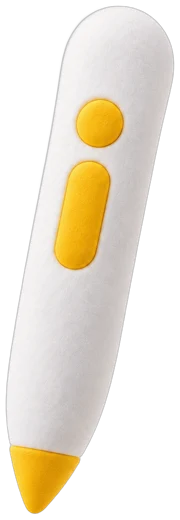
Long-press the round yellow button to turn the pen on.

Step 2
Tap a page
Touch a picture or word in a PonyABC book or card.

Step 3
Change language
Short-press the upper part of the long yellow button.

Step 4
Record
Tap the REC icon on the sticker card, tap a sticker and speak. Tap it again to hear it.
PonyABC Desktop
Free Windows app. Adds new books, backs up recordings and updates your pen.
Register your pen
For the P5 pen in the Time-Capsule Voice Sticker set: free 1-year warranty with your PABC- serial number.
Frequently asked questions
The PonyABC P5 pen
What is the PonyABC P5 Intelligent Recording Reading Pen?
A talking and recording pen for young children. Tap PonyABC books and cards and it reads aloud in up to 8 languages (English, Cantonese, Mandarin, French, German, Italian, Spanish and Portuguese). You can also record your own voice onto stickers. In Chinese it is called 點讀錄音筆.
Does it need Wi-Fi, an app or a phone?
No. Reading and recording work completely offline. You only need the free PonyABC Desktop app on a Windows computer to add new books, back up recordings or update the pen.
How do I switch it on, change the volume and change the language?
Long-press the round yellow button to switch on or off. Use the side + and – buttons for volume. Short-press the upper part of the long yellow button to change language. See How to use the P5 pen for every button.
How long does the battery last?
Up to about 5 hours of continuous use. A full charge takes about 3 hours with a USB-C cable.
Which pens have a warranty, and how do I register mine?
The free one-year PonyABC warranty applies to the P5 pen supplied in the Time-Capsule Voice Sticker set. To activate it, go to register.ponyabc.uk, enter the serial number starting PABC- (printed on the pen and on the box) and confirm your email. You can register at any time during the year, including when you first contact us.
The pen supplied in the Trilingual Encyclopedia set is the original publisher's own product. It has no PonyABC serial number, so it does not carry our one-year warranty. This does not affect your legal rights if an item is faulty: if anything goes wrong with a set you bought from us, email marketing@ponyabc.co.uk and we will help, and in practice a faulty item bought from PonyABC is refunded. See our Refund policy.
My pen doesn't speak when I tap the new flash cards.
Your pen needs the latest books. Connect it to PonyABC Desktop, click Sync books, then switch the pen off and on.
The buttons don't respond.
The pen may be in child lock mode. Long-press the upper part of the long yellow button to turn it off.
Which languages does it speak?
English, Cantonese, Mandarin, French, German, Italian, Spanish and Portuguese on PonyABC cards. The Trilingual Encyclopedia is Cantonese, Mandarin and English.
Recording stickers
How do I record my voice?
Tap the REC icon on the sticker card, tap a sticker and speak. Tap the sticker again to play it back. Record again on the same sticker to replace it.
What can I use recording stickers for?
Turn any picture book into a talking book, make talking word walls and labels for your classroom, let parents record home-language words for EAL children, record routine reminders, or keep a family voice forever.
Phonics & Colour cards
Are the cards durable enough for a nursery?
Yes. They're made from tough PVC: waterproof, tear-resistant, wipe-clean and non-toxic, with rounded corners.
Do the cards include the pen?
No. They work as normal flash cards on their own; add a P5 pen for 2,000+ sounds in 8 languages. They will also work with the upcoming PonyABC Gateway, which works with Philips Hue lights (sold separately). PonyABC is not affiliated with Philips or Signify.
Orders, delivery and returns
How much is delivery?
UK Standard £4.99 — free on orders over £50. UK Express £6.99. UK orders are sent by Royal Mail or Evri. International delivery is priced by the weight of your order and worked out automatically at checkout — see our Shipping policy for the full table. We do not ship to the United States at the moment.
Can I return something?
Yes. You have 14 days from the day your order arrives to tell us you have changed your mind, and a further 14 days to post it back. You may open the box and have a proper look at what you bought, just as you could in a shop — you only need to handle it no more than you would in a shop.
You pay the cost of posting the item back to us, wherever you live, the United Kingdom included. If an item is faulty, damaged in transit or not what you ordered, we pay the return postage and you will not be out of pocket. Please email marketing@ponyabc.co.uk before you post, so we can confirm the address and the cheapest sensible way to send it — you do not need our approval or a returns number to send something back. See our Refund policy.
Do you have discount codes?
We hand out discount coupons at exhibitions and events. Sign up to our newsletter at the bottom of the homepage to hear about the next one.
Can nurseries and schools order in bulk?
Yes. Email marketing@ponyabc.co.uk for class packs, quotes and invoices.
What ages are your products for?
Ages 3+ with adult supervision (Number Bonds is 5+). They are not suitable for children under 3.
More questions
Can I download the songs?
Yes. Every song is free to download as an MP3 in every language we offer on the Songs & Videos page, for personal and classroom use.